Excel Lookups Where
Each Match Is Unique
Stop getting duplicate assignments. XMATCHEXCLUSIVE ensures each lookup result is used only once — perfect for serial numbers, inventory, and unique matching.
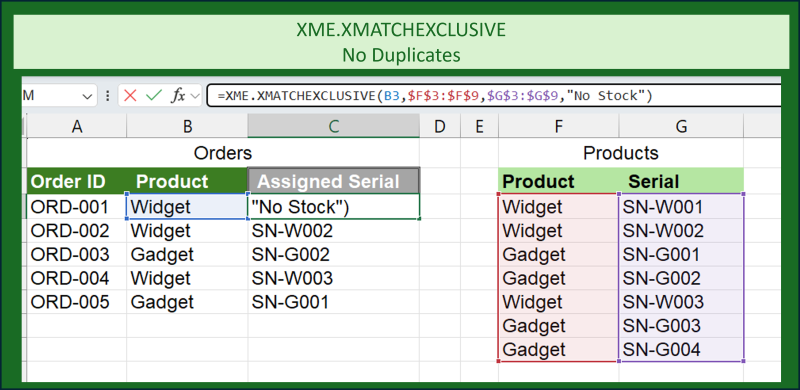
Stop getting duplicate assignments. XMATCHEXCLUSIVE ensures each lookup result is used only once — perfect for serial numbers, inventory, and unique matching.
Returns the same value for every matching lookup:
Order 1: Widget → SN-001
Order 2: Widget → SN-001 ← duplicate!
Order 3: Widget → SN-001 ← duplicate!
Each match is used only once:
Order 1: Widget → SN-001
Order 2: Widget → SN-002 ← unique!
Order 3: Widget → SN-003 ← unique!
Each row in your lookup range can only be matched once. No duplicates.
Matches persist through recalculations. Your assignments stay stable.
Clear all matches with one click when you need to start fresh.
See how many items are matched and track your progress.
Works just like XLOOKUP. If you know Excel, you're ready.
Matches save with your file. Share it and matches come too.
Try XMatch Exclusive free with 100 rows and 50 calls/day. No credit card required.
Download from Microsoft AppSource or sideload manually. After purchase, enter your license key in the add-in to unlock Pro.
Yes! Your license works on up to 3 devices. Deactivate one to activate another.
You revert to the free plan (100 rows, 50 calls/day). Your existing matches are preserved.
Yes — 30-day money-back guarantee, no questions asked.
Yes! Works with Excel for Windows, Mac, and Excel Online.
Absolutely. Everything happens locally in your workbook. We never see your data.
Join teams who've simplified their Excel workflows.
Get Started — Free Trial →